Showing posts with label Malware. Show all posts

Thursday, 26 December 2013

Hide your Virus in a Picture File


Items Needed:

  • Any Icon Changer

  • A Binder

  • A Brain   

    1) Create your virus. We shall call it ‘server1.exe’ for now.

    2) Get any picture file you want to distribute.

    3) Bind the ‘server1.exe’ and your picture file with any binder, we’ll call the binded file ‘virus1.exe’.

     3.5) I reccomend Easy Binder 2.0, which comes with a bytes adder and a icon extractor, aswell as some really good packing options. I’ve uploaded it, virus free, to: http://adf.ly/bELlI < This will be caught by your AV as “Binder/Kit”. It is not a virus, it is a binder than is not undectable. If you don’t wish to use it, that’s fine, find your own.

    4) Be sure you have ‘Hide common extensions’ unchecked in your Folder Options.

    5) Change the ‘virus1.exe’ to ‘%Picturename%.jpeg – %Email/Web Address%.com’. For example, we’ll call it ‘HPIC_119.jpeg – test@test.com’. 


    .com works the same as .exe, except fewer people actually know that’s what it really is.

    6) If you plan on distributing your virus via MSN, please skip to 7. If you plan on distributing your virus via file upload sites, please skip to 8.

    6.5) I recommend Icon Extractor V3.8 FULL with Serial, that can be downloaded from this thread:http://adf.ly/bEMJP


     7) You will now need to change the icon from that ugly box. Find the picture you added to the file, and make it an icon. How? Find one of the various online Picture to Icon converters. Once your picture is a .ico, use your Icon Changer program to change the icon of the file to the .ico you just made from the picture. When you send it to people on MSN, it will show a small box of the picture inside.


8) You will not need to change the icon from that ugly box. Using your Icon Changer program, find the .jpeg icon, and change the ugly box to the .jpeg icon.


9) Conclusion. Your file will now look like a legit picture to 9/10 people. Some people do know that .com is an extension, but the average computer user will not see any difference, and will download it without hesitation.

Thanks for reading........


Continue Reading

Wednesday, 20 November 2013

What Is Keylogger

keyloggersIn this tutorial i am going to talk about the most use piece of software besides from RAT by hackers to observe your activities on your computer and that is keyloggers. A keylogger is a software or hardware device which monitors each and every key typed by you on your keyboard. I am going to talk about different types of keylogger and how to be safe from keyloggers. So lets learn somthing about keyloggers.

 1. What is keylogger ?

You might have heard about keyloggers but really dont know what they are reading this article will clear your mind. A keylogger also know as keystroke logger is software or hardware device which monitors each and every key typed by you on your keyboard. You can not identify the presence of keylogger on your computer since it runs in background and also it is not listed in task manager or control panel. It can be used by parents to keep eye on their childrens or company owner to spy on their employes.2. How it can harm you ?In this section i will talk about how keylogger can harm you in different ways for example It can be used by your enemy or friend to get sensitive information such as your username and password, Bank credit card details, or any other activities you do on your computer.
  • Example: You login in to your Facebook account from a computer in which keylogger is install then your username and password will be captured.
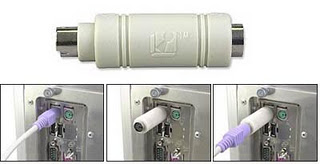
3. Types of  keyloggers There are two types of keylogger hardware keylogger and software keylogger. Software keylogger is install in your computer where as a Hardware keylogger is attached to your keyboard. Looking at below images will clear your mind.
                              HARDWARE KEYLOGGER                                  hardware keyloggers 
 SOFTWARE KEYLOGGER software keyloggers                                4. How to Protect yourself from keyloggers ?Keylogger  can be used by your enemy  to get sensitive information such as your Bank credit card details, or password of any social networking sites etc. In order to be safe keep following points in your mind.
  • Never use your online banking from cyber cafe. If you want to use then you can try this method. open notepad and type anything Then copy and paste each word that comes in your username or password.
  • You can even use above method to protect your facebook profile, yahoo or gmail id.
  • When you enter cyber cafe make sure that no hardware device is attached to keyboard wire. Its look something similar to above image.
Continue Reading

Thursday, 14 November 2013

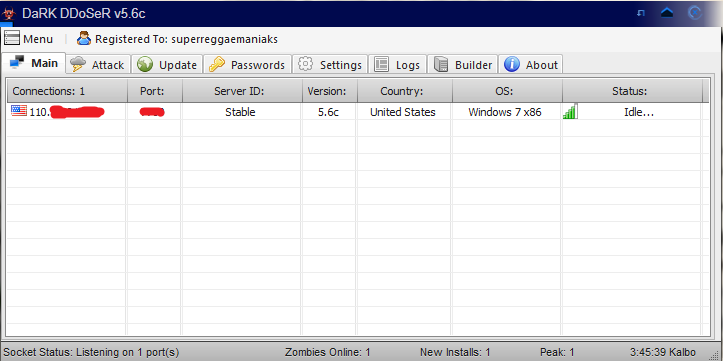
How to Setup Dark Doser 5.6~ [FULL Guide to DarkDdoser]


All of these programs are detected as viruses. I promise you they aren’t, and won’t cause any harm to your computer as long as they’re used correctly.

Downloads

 Dark-Ddoser


Get No-ip here


 http://www.noip.com/
 

Continue Reading

Saturday, 9 November 2013

How to Remove Write Protection from a Drive or Memory Card?

What is “Write Protection”? 


Nowadays, many storage devices, such as flash drive, USB drive, pen drive, SD card, CF card, memory stick, are    adopted the write protection function that can protect your drive or memory card data from any unexpected change (such as copying, pasting, deleting or cutting), except reading. So, at this point, it is a good property.
However, oppositely, as you have to copy, transfer or write any data, it naturally becomes an obstacle of farther operation, especially for some computer beginner. Therefore, today, we will talk about how to remove write protection for you.

The situations of different users:

Situation1. 

How can I remove the write protection on my USB flash drive?

Situation2.

 As I attempt to copy some photos from the external hard drive to computer, I receive an error message saying: “This Disk is write-protected. Remove the write protection or use another disk…” How could I remove it?

Situation3. 

I cannot format my SD card since it is write-protected. What should I do to disable it?

How to Remove Write Protection from a Drive or Memory Card?

<1>. Remove it by sliding the switch on the one side of a drive or memory card.


You could firstly check whether there is a switch on the one side of the drive or memory card, the switch that can generally close or open the write protection function.
Fortunately, if you find such a thoughtful switch, you could freely slide it to lock or unlock the write protection.
However, if you don’t find such a switch, don’t worry!
Read the next way.


<2>. Remove it by plunging the drive or memory card to a computer.  Unluckily, if there is no such a switch or the switch is gone, you also could try to remove the write protection by yourself.  


1. Plunge the drive or memory card to a computer. (Of course, you should use a card Reader to connect your memory card.)

2. Click “Start” on the taskbar to open “Run” and type in “regedit”.
3. Hit “HKEY_LOCAL_MACHINE” to expand “System”.
4. Find “Current Control Set” in “System” list to click “Control”.
5. Check whether there is a key named “Storage Device Policies” to change the digit in the “DWORD value” box into “0″ and press “OK”.

But, if you cannot find the key named “Storage Device Policies”, you are supposed to create a one: right click “Control” to create a new key and name it as “Storage Device Policies”=> right click this new key to highlight “DWORD Value” and name it as “write protect”=> Double click this “write protect” box to change the number.
<3>. Remove it by trying some special software.There are many related special software out there. You should make your decision carefully.

“Read-only” & “Write Protection”As to a “read only” drive or memory card, “read only” is absolutely another description for people to deliver the same meaning of “write protection”, especially for some computer beginner.
Therefore, in this situation, we could cope with the “read only” problem in the same way as the “write protection” problem.
However, as to a “read only” file or folder on your drive or memory card, the “read only” is quite different from “write protection” in some degree. It is only one of the file or folder attributes, not the whole drive or memory card attributes. Namely, we still could do some changes to the rest files or folders on our drive or memory card after part of files or folders become “read only”. However, we cannot do it to the write protected drive or memory card. That’s the difference.
Therefore, in this case, we could simply remove the “read only” like this:
Right click the file or folder to hit “Properties” and remove the sign in front of “Read only” attributes in “Properties” box.


Source = itrelated
Continue Reading

Friday, 18 October 2013

PDF - Vulnerabilities, Exploits and Malwares


Introduction:


Many people don't consider PDF files as a possible threat and oh, well I agree to them(!). It is not the PDF files but the rendering softwares we have to be afraid of. If you think I am referring to those Adobe Reader 0-days popping up periodically, hell yeah, you are RIGHT!. We are going to talk about PDF files, few Adobe Reader vulnerabilities, exploits and malwares that comes along with it ;)


Continue Reading

Thursday, 17 October 2013

Bypassing Anti-virus using Code Injection Technique


Introduction:


This article throws light on how 'Code Injection' or 'DLL Injection' technique can be used as prominent weapon along with other techniques to bypass Anti-virus softwares. It also explains top level technical details revolving around EXE internals, protectors/packers, encoded shellcodes, inner working of Antivirus etc

Continue Reading

Analysis of a Malacious PDF File


Yesterday, I downloaded a malicious PDF file for my regular analysis. I found something strange in the PDF file than the other malicious PDF files. The file was using a different kind of technique and I was not aware about it. But after some googling I found that the same technique was exposed in 2010 so it was not a new technique. 

Continue Reading